Short of bandwidth and yet want to download a batch of favourite Thutong resources? Then you need to create a ‘Favourite Resources’ list inside your ‘My Profile’ page.
The CD Cutting Tool supports the ability to create, manage and send a list of your favourite resources to the Department of Education. They will contact you for your full details in order to send you a CD of the digital resources you require.
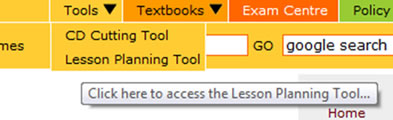
To access the CD Cutting Tool place your mouse over the top menu item called ‘Tools’.
A sub menu will drop down and you need to click, ‘CD Cutting Tool’.

 |
 |